Logo
  • TreeAMS Website
    • TreeAMS Wiki
      • TreeAMS Wiki
    • FAQ
      • Login Issues - FAQ
      • Attendance Feature – FAQ
      • Issue Tracker Feature – FAQ
    • Getting Started
      • Setting Up Your Site
      • Desk vs Portal
      • Private vs Public Media Content
      • Customising Your TreeAMS Site
    • TreeAMS App
      • How to Add a TreeAMS Shortcut to Your Home Screen
    • Insights
      • Introduction to TreeAMS Insights
      • How to Navigate TreeAMS Insights
    • Reports
      • Introduction to TreeAMS Reports
      • How to Use Reports in TreeAMS
    • Organisation
      • TreeAMS Organisation Introduction
      • Organisation Structure
      • Branch & Unit Details
      • Geolocation Setup
      • Address & Contact Setup
    • Legal Documents
      • Legal Dashboard Introduction
      • Document Setup
      • Document Reminder
    • Documents
      • TreeAMS Drive Introduction
    • User
      • User Types
      • Adding & Disabling a User
      • Setting the Language in TreeAMS
    • Teams
      • Setting Up Teams
    • Content
      • TreeAMS Content Introduction
      • Content Types: Blocks vs Collections
      • Content Category
      • Content Permission
      • Content Block: Article
      • Content Block: Video
      • Content Block: Checklist
      • Content Block: Quiz
      • Content Block: Evaluation
      • Content Block: Audit
      • Content Block: Slides
      • Content Block: Workflow
      • Content Collection: Manual
      • Content Collection: Training Course
      • Content Collection: Audit Program
    • Products
      • TreeAMS Products Introduction
      • Adding a Supplier
      • Adding a Product
      • Creating a Product List
      • How to Use Product Cart
      • How to Use Product Order
      • How to Use Product Level
    • Assignment
      • Types of Task in TreeAMS
      • Add New Assignment
      • Assigning a Checklist
      • Assigning a Training
      • Assigning an Audit
      • Assigning a Workflow
      • Assigning a File Upload Task
      • Assigning a File Download Task
    • Conduct Assignments
      • Introduction, Library, Checklist & Training
      • Conduct Audit for Auditor
      • Conduct Audit for Assignee
      • Conduct a Workflow in TreeAMS
    • Issue Tracker
      • What is Issue Tracker?
      • Setup Issue Tracker
      • How to Use the Issue Tracker
    • 📝 Release Notes
      • December 2024
      • January 2025
      • February 2025
      • March 2025
      • April 2025
      • May 2025
      • June 2025
      • July 2025
      • August 2025
      • September 2025
      • October 2025
      • November 2025
      • December 2025
    Edit Sidebar
    Add Group
    View Sidebar
Review Changes

				
  • TreeAMS Wiki
    • TreeAMS Wiki
  • FAQ
    • Login Issues - FAQ
    • Attendance Feature – FAQ
    • Issue Tracker Feature – FAQ
  • Getting Started
    • Setting Up Your Site
    • Desk vs Portal
    • Private vs Public Media Content
    • Customising Your TreeAMS Site
  • TreeAMS App
    • How to Add a TreeAMS Shortcut to Your Home Screen
  • Insights
    • Introduction to TreeAMS Insights
    • How to Navigate TreeAMS Insights
  • Reports
    • Introduction to TreeAMS Reports
    • How to Use Reports in TreeAMS
  • Organisation
    • TreeAMS Organisation Introduction
    • Organisation Structure
    • Branch & Unit Details
    • Geolocation Setup
    • Address & Contact Setup
  • Legal Documents
    • Legal Dashboard Introduction
    • Document Setup
    • Document Reminder
  • Documents
    • TreeAMS Drive Introduction
  • User
    • User Types
    • Adding & Disabling a User
    • Setting the Language in TreeAMS
  • Teams
    • Setting Up Teams
  • Content
    • TreeAMS Content Introduction
    • Content Types: Blocks vs Collections
    • Content Category
    • Content Permission
    • Content Block: Article
    • Content Block: Video
    • Content Block: Checklist
    • Content Block: Quiz
    • Content Block: Evaluation
    • Content Block: Audit
    • Content Block: Slides
    • Content Block: Workflow
    • Content Collection: Manual
    • Content Collection: Training Course
    • Content Collection: Audit Program
  • Products
    • TreeAMS Products Introduction
    • Adding a Supplier
    • Adding a Product
    • Creating a Product List
    • How to Use Product Cart
    • How to Use Product Order
    • How to Use Product Level
  • Assignment
    • Types of Task in TreeAMS
    • Add New Assignment
    • Assigning a Checklist
    • Assigning a Training
    • Assigning an Audit
    • Assigning a Workflow
    • Assigning a File Upload Task
    • Assigning a File Download Task
  • Conduct Assignments
    • Introduction, Library, Checklist & Training
    • Conduct Audit for Auditor
    • Conduct Audit for Assignee
    • Conduct a Workflow in TreeAMS
  • Issue Tracker
    • What is Issue Tracker?
    • Setup Issue Tracker
    • How to Use the Issue Tracker
  • 📝 Release Notes
    • December 2024
    • January 2025
    • February 2025
    • March 2025
    • April 2025
    • May 2025
    • June 2025
    • July 2025
    • August 2025
    • September 2025
    • October 2025
    • November 2025
    • December 2025
Edit Sidebar
Add Group
View Sidebar
This space has {{ pending_patches_count }} change(s) pending for review.

Legal Dashboard Introduction

This section covers:

  1. What is Legal Dashboard in TreeAMS?
  2. Different Types of Legal Documents in TreeAMS

🤔 What is Legal Dashboard in TreeAMS?

The Legal Dashboard in TreeAMS gives you a quick overview of all legal documents across your network and their renewal status. It helps you monitor documents that are approaching expiry so you can take timely action.
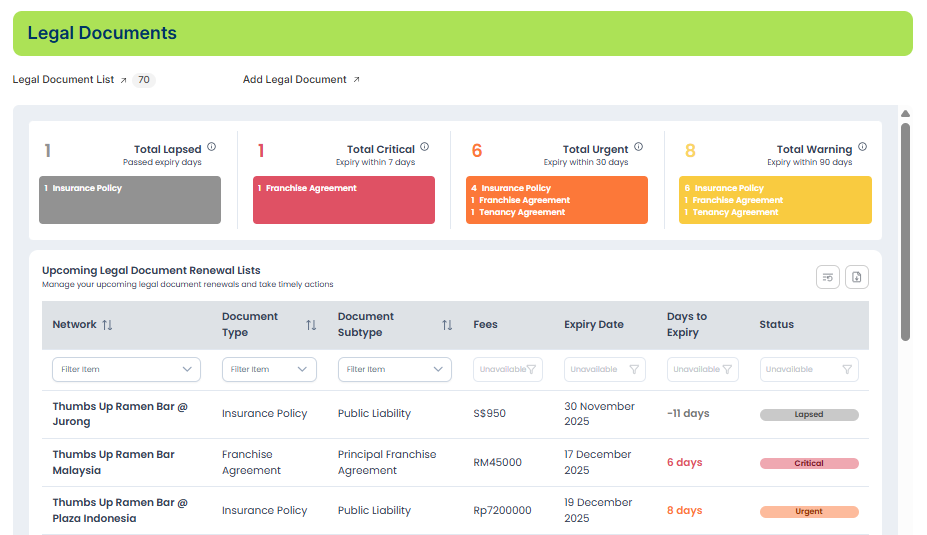

The dashboard displays four key status categories:

  • ⚫ Lapsed — Documents that have already passed their expiry date.
  • 🔴 Critical — Documents expiring within 7 days.
  • 🟠 Urgent — Documents expiring within 30 days.
  • 🟡 Warning — Documents expiring within 90 days.

Each status box shows the total number of documents in that category, along with the document types included.

💡 Interactive Filtering
All status boxes are clickable. When you click a status (e.g., Critical), the document list below will automatically filter to show only documents with that specific status.
This makes it easy to focus on items that need immediate attention.

The table below the dashboard displays:

  • Network / Outlet 👉 Shows which branch or location the legal document belongs to.
  • Document Type 👉 The main category of the legal document (e.g., Insurance Policy, Franchise Agreement).
  • Document Subtype 👉 A more specific classification under the document type (e.g., Public Liability).
  • Fees 👉 The cost or renewal fee associated with the document.
  • Expiry Date 👉 The date when the document will expire.
  • Days to Expiry 👉 How many days remain before the document reaches its expiry date.
  • Status 👉 Indicates whether the document is Lapsed, Critical, Urgent, or Warning.

You can also use the dropdown filters to refine the data further (e.g., by document type, subtype, network).

📄 Different Types of Legal Documents in TreeAMS

TreeAMS categorizes legal documents to help you organize and manage them effectively. Some of the common document types include:

  1. Franchise Agreement
    Used for franchise businesses to track contractual agreements such as Principal Franchise Agreement, Renewal Franchise Agreement, Addendums or amendments.
  2. Tenancy Agreement
    Documents related to rental or leasing of physical outlets, including Tenancy or lease contracts, Renewals or extensions, Rental-related legal documents.
  3. Insurance Policy
    Covers various insurance-related documents such as Public Liability, Fire Insurance, Work Injury Compensation, Other insurance policy types required for operations.
  4. Business Licence
    Licences required for legal operation of the business, such as Food & Beverage Licences, Retail Operation Permits, Local government business permits.
  5. Certificate
    Mandatory certificates required for compliance or operational approval, such as Food Safety Certificates, Hygiene Certifications, Fire Safety Certificates.

To learn how to create a Legal Document in TreeAMS, refer to this link:
👉 https://howto.treeams.com/document-setup

If you need assistance, please email us at connect@treeams.com.
We are happy to help! 👋😊

Legal Dashboard Introduction
stella edited 4 days ago

No Revisions

Page Settings
legal-dashboard-introduction/
Discard
Save
Toggle Dropdown
Draft
Title
Enter title for the new Wiki Group

Previous Page

Left

Next Page

Right

On this page

  • Legal Dashboard Introduction
  • 🤔 What is Legal Dashboard in TreeAMS?
  • 📄 Different Types of Legal Documents in TreeAMS
Review Changes ← Back to Content
Message Status Space Raised By Last update on